
Fractal Channels • Multiple Time Frame Price Action • Time-Based Volume
The Trend Rider Trading System is a complete trend-following toolkit built around a computer-assisted, manually-triggered trading model. You identify the setup; the system handles execution timing, position tracking, and risk management. It includes everything needed to scan for multi-timeframe trend alignment, enter trades with precise timing, monitor open positions with AEP-based profit targets, and backtest your trading ideas against historical data.
The package contains 10 components:
CT_Trend_Rider_v2 — the primary strategy, controlled by a mode-switcher trend line you draw on the chart:
Once you set the mode, entries are managed automatically using one of three configurable methods: SP Harmony (Super Smoother consensus across multiple lengths), FX Cross (price-action/fractal crossover signal), or Standard Deviation (entry when price crosses a Bollinger Band-style SD boundary). A minimum bar count between entries prevents rapid-fire fills; an entry time window limits activity to your active session hours.
Profit exits fire in three stages as the trade becomes profitable, with the exit percentages and profit levels fully configurable. An optional Profit Lock feature activates once the trade reaches a specified profit percentage — if price pulls back by a configurable amount from the locked level, the strategy exits to protect the accumulated gain.
Position sizing is automatic by asset class: forex sized in units (default 100,000), stocks in shares (default 100), futures in contracts.
CT_Trend_Rider_v1 — earlier version of the Trend Rider strategy. Use v2 for new setups; v1 is included for users with existing v1 workspaces.
CT_Trend_Rider_Lines — simplified variant that generates entries from manually drawn trend line crossovers on the chart. Draw a trend line at a support or resistance level; when price crosses it in the breakout direction, the strategy enters. Suited for traders who prefer classic trend line analysis.
CT_TL_Trader_Manual — the most direct entry method in the package. You drag a trend line on the chart to your exact entry price; the strategy executes when price reaches it. A second line sets the stop loss; a third sets the profit target. The chart displays live trade statistics: quantity, dollar risk, open P&L, and reward-to-risk ratio. Supports dynamic position sizing (account balance × percent at risk ÷ stop distance) or fixed quantity mode.
CT_Historical_Trades — the primary backtesting tool. Annotate TrendLine text objects on a historical chart with direction codes, and the strategy replays them as real TradeStation orders bar by bar — calculating a full Strategy Performance Report. Direction codes:
+, a, A, l, L — Buy (long entry)−, x, X, s, S — Sell Shortf, F — Partial flat (exit by configurable quantity)c, C, o, O — Close all (exit entire position)Up to 500 trade annotations per chart are supported.
CT_Historical_Single_Trade — places a single historical trade at a specified date, time, direction, and quantity. Use this to isolate and test one specific setup without annotating multiple TrendLine objects.
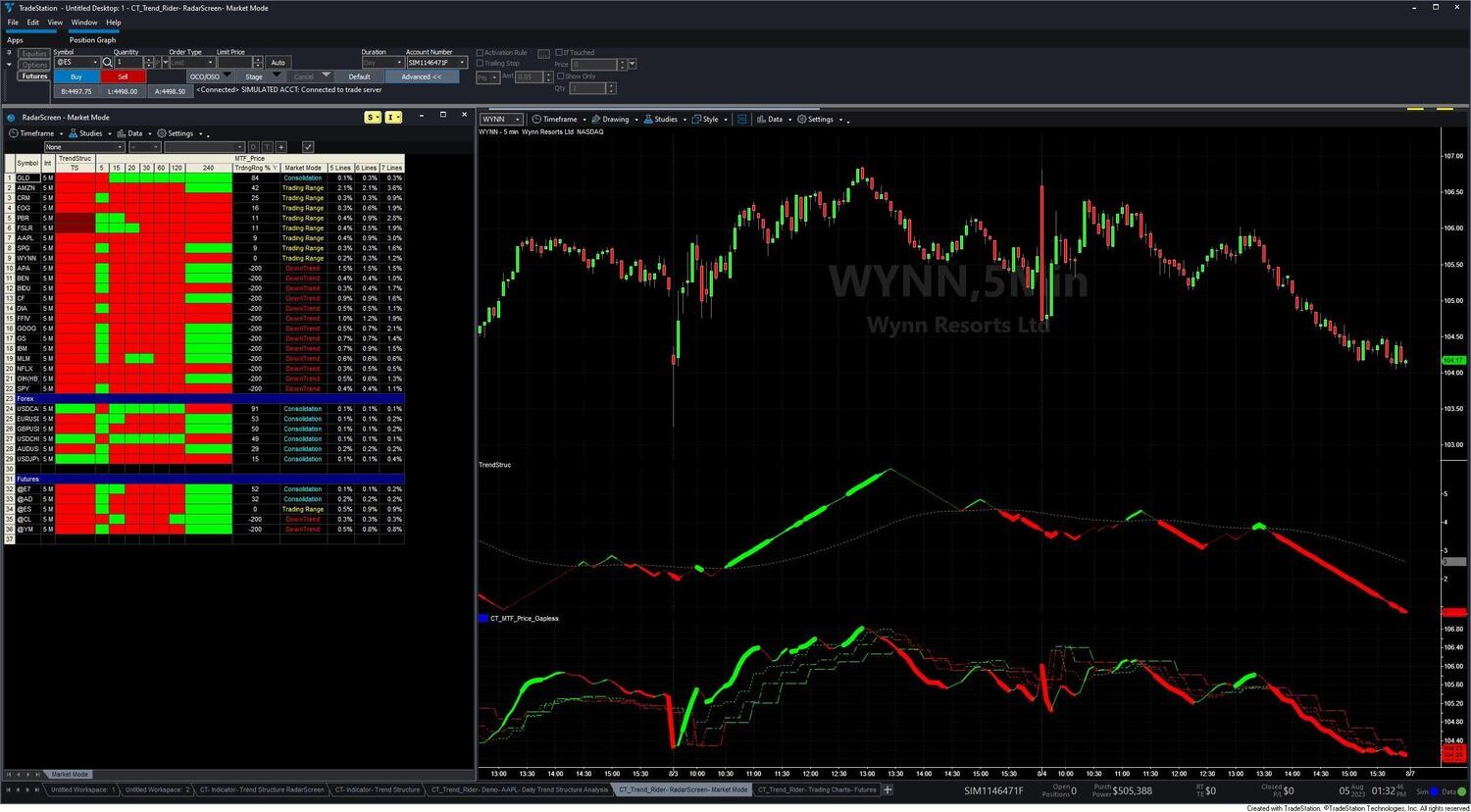
CT_Trend_Structure — subchart oscillator showing trend momentum direction and SP Harmony conviction. Colors: Green = all SP lengths bullish (highest conviction long), DarkGreen = bullish bias but momentum fading, Red = all lengths bearish (highest conviction short), DarkRed = bearish bias but momentum lifting. Includes adaptive gapless correction and an optional trigger line for crossover alerts. Works on charts, RadarScreen, and Scanner. (This is the same CT_Trend_Structure included in the standalone Trend Structure Indicator product.)
CT_Trend_Rider_AEP — reads the open strategy position and plots two reference lines on the price chart:
AEP ± (AverageRange × Range_Multiplier + AverageRange)Use MinPrftPrice as a visual checkpoint to ensure any partial or full exit occurs at a profit, not just at break-even.
CT_MTF_Price_Gapless — gapless multi-timeframe price trend lines for eight timeframes on one intraday chart (current interval, 15, 20, 30, 60, 120, 240 min, and daily). Green when rising, Red when falling. Line width reflects SP Harmony conviction. Requires intraday time-based chart of 60 minutes or less.
CT_RS_MTF_Price_Action — scans your watchlist across seven intraday timeframes and classifies each symbol into one of four Market Mode states:
Alerts are available for Market Mode changes and consolidation breakout events. Focus on MTF Uptrend and MTF Downtrend symbols for trend-following entries; MTF Consolidation symbols may be approaching a directional move.
11 pre-configured TradeStation workspace files are included:
What are the 10 components?
Six strategies (CT_Trend_Rider_v2, v1, Lines, CT_TL_Trader_Manual, CT_Historical_Trades, CT_Historical_Single_Trade), three chart indicators (CT_Trend_Structure, CT_Trend_Rider_AEP, CT_MTF_Price_Gapless), and one RadarScreen indicator (CT_RS_MTF_Price_Action). Plus 11 workspace files, 9 training videos, and all future updates.
What is the mode-switcher trend line in CT_Trend_Rider_v2?
You draw a single trend line on your chart and change its color to control the strategy: Green = look for long entries, Red = look for short entries, Magenta = go flat immediately, White = inactive. The strategy monitors the line color each bar and adjusts its behavior accordingly. You control direction; the strategy controls execution timing.
How does CT_Historical_Trades work for backtesting?
You visually mark historical trade entry and exit points on a chart using TrendLine text objects with direction codes (+ or L for long entries, − or S for short entries, f for partial exits, c for close all). The strategy reads those annotations, sorts them chronologically, and fires the corresponding orders — giving you a full TradeStation Strategy Performance Report for your marked trades.
Is CT_Trend_Structure the same as the standalone Trend Structure Indicator product?
Yes — CT_Trend_Structure included in the Trend Rider system is the same indicator available as a standalone product. If you purchase or already own the standalone Trend Structure Indicator, you already have it.
Are future updates included?
Yes. All future updates and enhancements to the Trend Rider Trading System are included at no additional cost to existing customers.
What is your refund policy?
All sales are final. Review our product documentation and the Learning Center before purchasing. If you have a technical issue after purchase, contact [email protected].
Our indicators and trading systems are built by active traders, not software developers — every tool in this library exists because we needed it ourselves. That means each product solves a specific, real-world trading problem: the Fractal Channel Indicator gives you non-repainting support and resistance based on actual price structure, the MTF Price Action Indicator Set eliminates the need to manually correlate multiple charts, and the Risk Reward Indicator automates stop placement and position sizing on every trade.
Every indicator is built around multi-time-frame confirmation — the single most reliable edge available to independent traders. Our MTF suite covers RSI, MACD, ADX, Stochastic, VWAP, Floor Trader Pivots, and Fractal Channel, all displaying multiple time frames simultaneously on a single TradeStation chart. When a signal is confirmed across four, six, or eight time frames at once, the probability of a successful trade improves significantly over any single-time-frame analysis.
Our complete trading systems — the Scalper Day Trading System, MTF Trend, and MTF Consolidation Breakout — go beyond individual indicators. Each system combines RadarScreen scanning, multi-time-frame analysis, chart-based execution, and automated exit management into a fully integrated workflow. Your computer does the scanning; you make the trading decisions.
All products are instant digital downloads for TradeStation 10 and later, compatible with any market and any chart type. Every purchase includes a step-by-step installation guide, Learning Center video access, and email support. Future updates to all trading systems are included at no additional cost.