
Fractal Channels • Multiple Time Frame Price Action • Time-Based Volume
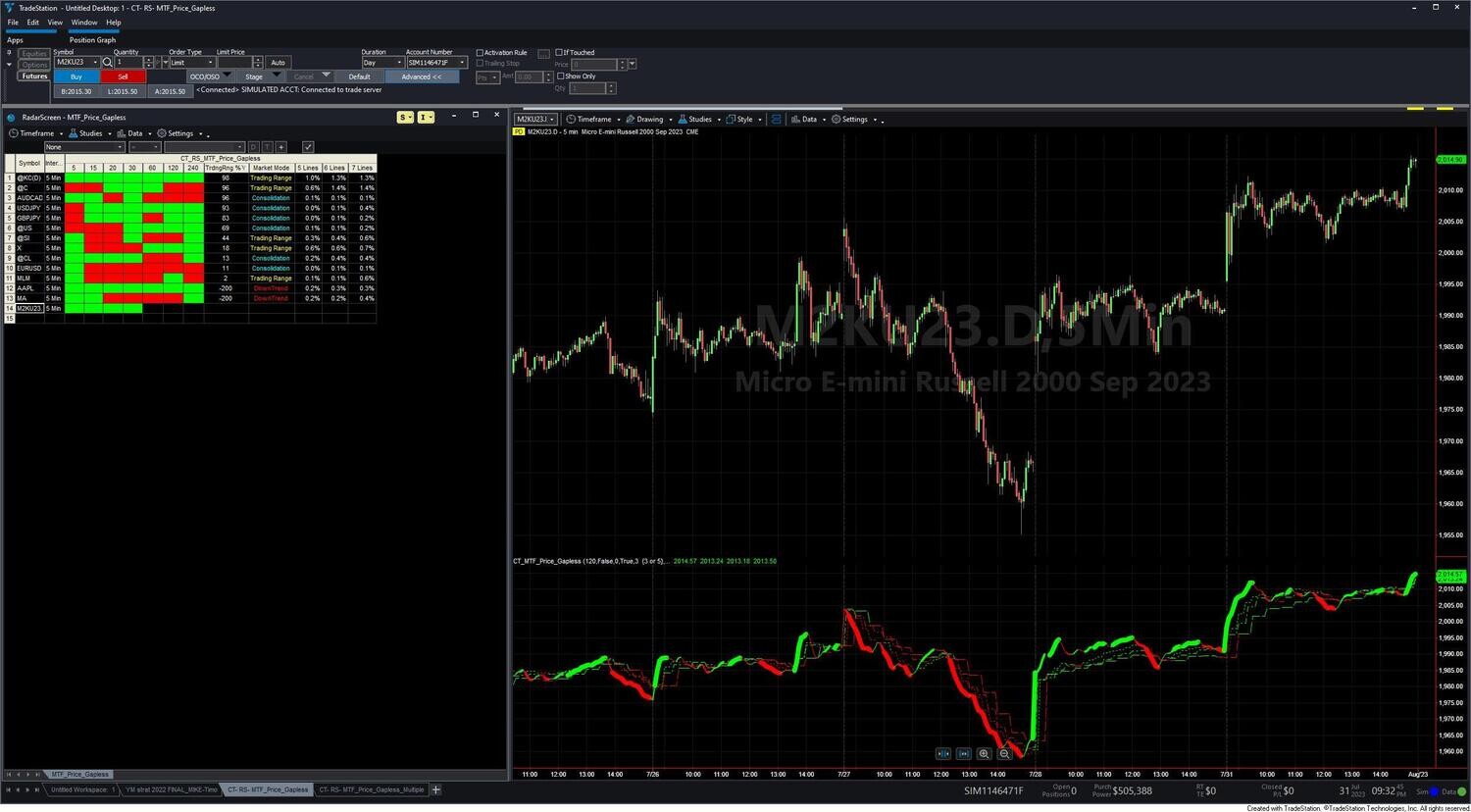
The CT RS MTF Price Indicators give you a multi-timeframe trend dashboard directly inside TradeStation RadarScreen. Each symbol in your watchlist gets a row of color-coded cells — one cell per timeframe — showing trend direction and a Market Mode classification (UpTrend, DownTrend, Consolidation, or Trading Range) updated bar by bar across your entire list simultaneously. Instead of opening individual charts to assess market mode, you scan your whole watchlist at once and drill into only the symbols worth examining.
The package contains three indicators, each covering a different bar type and market:
All three indicators share the same core engine: Super Smoother price smoothing applied to gapless-adjusted closes, producing a price action line for each timeframe. Each line's direction — rising or falling — determines the cell color: green = bullish bias, red = bearish bias.
Column 1 (current bar interval) also carries an SP Harmony score. Five Super Smoother lengths (13, 21, 34, 55, 89 bars) each vote +1 (rising) or −1 (falling); the sum drives both cell color and foreground text intensity — solid color when all five agree, faded when signals are mixed. This gives you conviction at a glance, not just direction.
The Market Mode column is the primary watchlist filter — it compresses all timeframe relationships into one label:
Additional columns: the Trading Range % column shows where current price sits within the full span of all timeframe values (0% = at the low, 100% = at the high) — useful for timing mean-reversion entries during Consolidation or Trading Range modes. Spread columns display the percentage spread across 5, 6, and 7 timeframe bands — lower values mean tighter alignment and higher-conviction trend or tighter consolidation.
CT_RS_MTF_Price_Action uses fixed 15, 20, 30, 60, 120, and 240-minute clock boundaries. It is bar-interval aware — it automatically suppresses timeframe columns that are redundant for the bar interval you set in RadarScreen (for example, the 15-min and 20-min columns will not populate on a 30-minute RadarScreen). Consolidation_Spread_Percent defaults to 0.15% — a tight threshold suited to the lower overnight volatility of stocks and ETFs. Includes market mode change alerts and consolidation alerts.
CT_RS_MTF_Price_Gapless is functionally identical but with the adaptive gapless correction fully active for the SP Harmony overlay on Column 1. When a significant overnight gap crosses the moving average, the Harmony score automatically switches to gap-corrected prices for up to 80 bars, preventing false directional signals. Consolidation_Spread_Percent defaults to 0.5% — calibrated for the higher overnight volatility typical of futures. Best for ES, NQ, CL, GC, and major forex pairs.
CT_RS_MTF_Price_Gapless_Multiple builds higher timeframes as multiples of your RadarScreen bar interval — not fixed clock times. Default multiples: 1×, 3×, 6×, 9×, 12×, 15×, 20×, 25×. Example on 5-minute bars: Column 2 = 15 min (3×5), Column 3 = 30 min (6×5), Column 5 = 60 min (12×5). All multiples are configurable. This is the only version that works on tick, range, and volume bars in RadarScreen, where fixed clock boundaries are meaningless. Applies the most complete gapless correction of the three variants — directly to OHLC values before all calculations.
High-conviction trend: all timeframe cells the same color + Market Mode = UpTrend or DownTrend + Column 1 shows solid color (high SP Harmony) + spread columns show low % (timeframes tightly clustered).
Breakout setup developing: Market Mode = Consolidation (cyan) + Trading Range % column oscillating near 0% or 100% — watch for the Market Mode to shift to UpTrend or DownTrend as the breakout fires. Enable the Consolidation alert to get notified on every bar while in this state.
Avoid trending entries: Market Mode = Trading Range (yellow) or mixed cell colors with no dominant direction — wait for alignment before entering trend trades.
The CT RS MTF Price Indicators are for TradeStation traders who monitor a watchlist and want to filter symbols by multi-timeframe trend condition without opening individual charts. Specifically:
Which of the three indicators should I use?
If you are watching stocks or ETFs on standard session hours — use CT_RS_MTF_Price_Action. It uses a tight 0.15% consolidation threshold calibrated for lower overnight volatility, and it includes market mode alerts. If you are watching futures (ES, NQ, CL) or forex — use CT_RS_MTF_Price_Gapless, which applies adaptive gapless correction to prevent overnight gaps from creating false Harmony signals. If you use tick, range, or volume bars in RadarScreen — use CT_RS_MTF_Price_Gapless_Multiple, the only version that works on non-time-based bar types.
What is the Market Mode column and how do I use it?
The Market Mode column compresses all timeframe relationships into one label. UpTrend means the current-bar timeframe is above all higher timeframes — the strongest trending state. DownTrend means it is below all higher timeframes. Consolidation (cyan) means all timeframes are clustered within the Consolidation_Spread_Percent threshold — a potential breakout setup. Trading Range (yellow) means timeframes are spread apart with no clean alignment. Use UpTrend to filter long candidates, DownTrend for short candidates, and watch Consolidation closely for breakout timing.
What does the SP Harmony score on Column 1 tell me?
Column 1 shows the current-bar timeframe direction, with the cell color intensity driven by SP Harmony — five Super Smoother lengths (13, 21, 34, 55, 89 bars) each voting rising (+1) or falling (−1). A solid, bright cell means all five lengths agree on direction — maximum conviction. A faded cell means the lengths are split. This is the same SP Harmony scoring used in the MTF Price Action chart indicators; UpTrend with a solid Column 1 is the highest-conviction state in the system.
What is the Trading Range % column?
When a symbol is in Consolidation or Trading Range mode, the Trading Range % column shows where the current price sits within the full span of all timeframe values — 0% means price is at the low end of the timeframe spread, 100% means it is at the high end. Use this to time mean-reversion entries: look to buy near 0% and sell near 100% when the Market Mode is Trading Range.
How does CT_RS_MTF_Price_Gapless_Multiple work on tick and range charts?
Instead of targeting fixed clock times (15:00, 30:00), this indicator builds higher timeframes by counting bars. Every 3 bars it closes a 2X band, every 6 bars a 3X band, and so on up to the 8X band at 25 bars. Since these multiples are based on bar counts rather than time, they produce coherent higher timeframes on any bar type — tick, range, volume, or Renko. Adjust the multiple inputs to match your preferred timeframe ratios.
Can I use this alongside the MTF Price Action Indicator Set?
Yes — this is the recommended workflow. Use the CT RS MTF Price Indicators in RadarScreen to scan your watchlist and identify which symbols have UpTrend or Consolidation conditions across multiple timeframes. Then open a chart for those symbols and apply the MTF Price Action Indicator Set for detailed price action, width, and entry signal analysis. The RadarScreen indicators use the same SP Harmony engine, so the trend readings are consistent between RadarScreen and chart.
How do I install these indicators in TradeStation?
After purchase you will receive EasyLanguage (.eld) files and pre-configured RadarScreen workspace files. Import the EasyLanguage files via File > Import/Export > Import EasyLanguage, then open the provided workspace files. Step-by-step instructions and a training video are included. Most traders are up and running in under 15 minutes.
What is your refund policy?
All sales are final. We encourage you to review our product videos and chart examples in the Learning Center before purchasing. If you have a technical issue after purchase, our support team is here to help.


Our indicators and trading systems are built by active traders, not software developers — every tool in this library exists because we needed it ourselves. That means each product solves a specific, real-world trading problem: the Fractal Channel Indicator gives you non-repainting support and resistance based on actual price structure, the MTF Price Action Indicator Set eliminates the need to manually correlate multiple charts, and the Risk Reward Indicator automates stop placement and position sizing on every trade.
Every indicator is built around multi-time-frame confirmation — the single most reliable edge available to independent traders. Our MTF suite covers RSI, MACD, ADX, Stochastic, VWAP, Floor Trader Pivots, and Fractal Channel, all displaying multiple time frames simultaneously on a single TradeStation chart. When a signal is confirmed across four, six, or eight time frames at once, the probability of a successful trade improves significantly over any single-time-frame analysis.
Our complete trading systems — the Trend Rider, Scalper Day Trading System, MTF Trend, Counter Trend, and MTF Consolidation Breakout — go beyond individual indicators. Each system combines RadarScreen scanning, multi-time-frame analysis, chart-based execution, and automated exit management into a fully integrated workflow. Your computer does the scanning; you make the trading decisions.
All products are instant digital downloads for TradeStation 10 and later, compatible with any market and any chart type. Every purchase includes a step-by-step installation guide, Learning Center video access, and email support. Future updates to all trading systems are included at no additional cost.