
Fractal Channels • Multiple Time Frame Price Action • Time-Based Volume
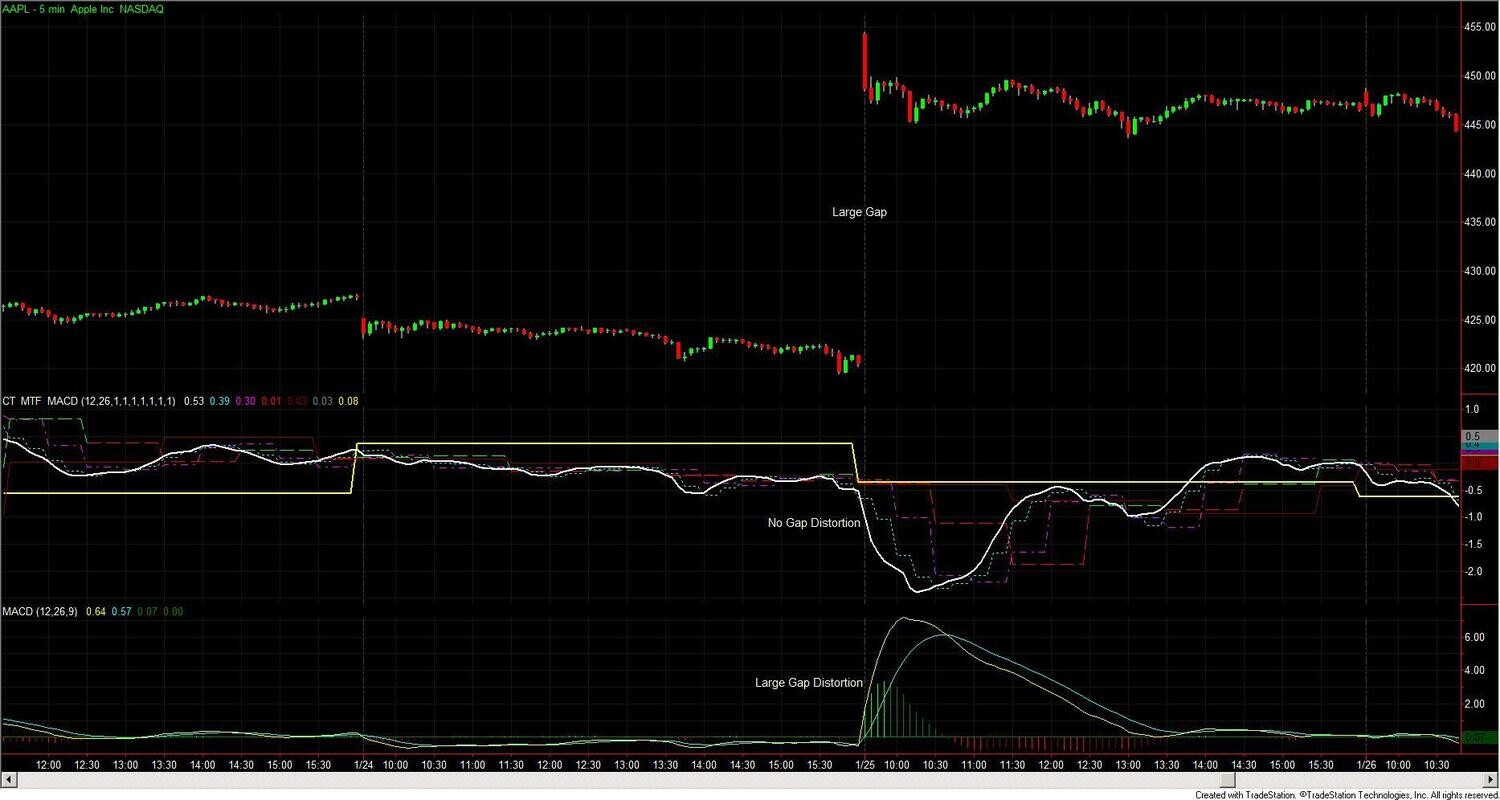
The MTF MACD Indicators display MACD momentum across multiple timeframes simultaneously — in a single subchart panel on your chart, or as color-coded columns in RadarScreen. Every timeframe shows its own MACD line oscillating above and below zero, so you can see at a glance whether momentum is aligned across timeframes or in conflict before entering a trade. A 5-minute MACD crossover with the 60-minute and daily MACD still falling is a different trade than the same crossover when all timeframes are rising together.
The package contains two indicators. CT_MTF_MACD uses fixed clock-time timeframes (current bar, 15-min, 30-min, 60-min, 120-min, 240-min, Daily) and works on intraday time-based charts and RadarScreen. CT_MTF_MACD_Multiple builds higher timeframes as configurable bar-count multiples of your current chart bar, making it compatible with tick, volume, range, and any non-standard bar type — as well as time-based charts where you want custom timeframe spacing.
Both indicators calculate MACD on a gapless price series — overnight gaps are removed before the calculation so gap-driven MACD swings do not generate false signals. The result is a MACD that reflects intraday and multi-session momentum without distortion from overnight gap openings. Fast length defaults to 12, slow length to 26 — both are configurable.
Displays up to 7 MACD lines at fixed clock-time boundaries: current bar interval, 15-min, 30-min, 60-min, 120-min, 240-min, and Daily. Each line can be independently enabled or disabled. The indicator is bar-interval aware — lower-timeframe plots are automatically suppressed when the chart interval is too wide for them to be meaningful. For example, the 15-minute MACD line does not appear on a 30-minute chart. All plots are suppressed until 300 bars have accumulated to allow the exponential averages to stabilize.
On a chart: each enabled timeframe plots as its own MACD line in the subchart panel below the price bars. In RadarScreen: each timeframe appears as a color-coded column showing the current MACD value — green when the MACD is rising, red when it is falling. The color persists until momentum reverses.
Valid on intraday time-based charts (1-minute through 60-minute) and RadarScreen. Raises a runtime error on tick, volume, or range charts — use CT_MTF_MACD_Multiple for those.
Builds higher-timeframe MACD by counting multiples of the current chart bar rather than targeting fixed clock times. Default multiples: 1×, 3×, 6×, 9×, 12×, 15×, 20×. Example on a 5-minute chart: MACD-2X = 15 min (3×5), MACD-3X = 30 min (6×5), MACD-5X = 60 min (12×5), MACD-7X = 100 min (20×5). All multiples are user-configurable. Each higher-timeframe plot is suppressed until 300 completed bars have accumulated at that multiple's effective timeframe.
Works on any bar type in TradeStation: time-based, tick, volume, range, and Renko. Same chart subchart panel and RadarScreen color-coded column display as CT_MTF_MACD.
On a chart: The subchart panel shows all enabled timeframe MACD lines oscillating above and below zero. A MACD line crossing above zero means the fast average has moved above the slow average on that timeframe — a bullish crossover. Multiple timeframe lines crossing zero together strengthens the signal.
In RadarScreen: Each column shows the current MACD value with a color-coded background. All-green alignment across columns = momentum rising across all timeframes — the highest-conviction bullish condition. All-red = highest-conviction bearish. Divergence — shorter timeframes turning green while longer ones remain red — signals a potential shift that the higher timeframes have not yet confirmed. These situations often precede a reversal, or the shorter timeframe fails and reverts to match the longer one.
The MTF MACD Indicators are for TradeStation traders who use MACD as a momentum filter and want to see alignment across timeframes before entering a trade. Specifically:
Pairs naturally with the MTF Price Action Indicator Set (trend direction and conviction) and the Fractal Channel Indicator (structural support and resistance for stop placement). MACD adds the momentum confirmation layer — whether the current move is accelerating or decelerating — across all timeframes at once.
Which indicator should I use?
If you trade intraday time-based charts (1-minute through 60-minute), use CT_MTF_MACD — it targets exact clock-time boundaries (15-min, 30-min, 60-min, etc.) and is bar-interval aware, automatically hiding redundant lower-timeframe columns in RadarScreen. If you trade tick, volume, or range bars, or want custom timeframe spacing on a time-based chart, use CT_MTF_MACD_Multiple and set the bar-count multiples to approximate your preferred timeframes.
What does "gapless" mean for MACD?
A standard MACD applied to intraday stock or futures data is distorted by overnight gaps. When price opens significantly higher or lower than the prior close, the exponential averages jump, creating a MACD reading that reflects the gap rather than intraday momentum. The gapless correction strips each session's overnight gap from the price series before the MACD is calculated, so the indicator responds to intraday price movement rather than to open-to-close gap artifacts.
What does the color in RadarScreen mean?
Green = the MACD at that timeframe is rising (current value is greater than the prior value) — upward momentum is building or continuing. Red = the MACD is falling — downward momentum is building. The cell also displays the current MACD value as a number. When multiple timeframe columns are all the same color, momentum is aligned across those timeframes — the highest-conviction signal. When shorter timeframes show a different color than longer ones, momentum is diverging and the situation calls for caution.
Why are some timeframe plots not appearing?
Two reasons: first, CT_MTF_MACD automatically suppresses lower-timeframe plots that are redundant for your chart interval — the 15-minute plot does not appear on a 30-minute chart. Second, all plots require 300 bars of history before they begin drawing, to allow the exponential averages to stabilize. On a newly loaded chart or a symbol with limited history, some plots will be blank until enough bars have accumulated.
How does CT_MTF_MACD_Multiple work on tick and range charts?
Instead of targeting clock times, CT_MTF_MACD_Multiple counts bars. Every 3 bars it closes a 2X MACD band, every 6 bars a 3X band, and so on. On a 100-tick chart with the default multiples, MACD-2X = a 300-tick MACD, MACD-5X = a 1200-tick MACD. Adjust the multiples to match the ratio between timeframes you want to analyze. The 300-bar warmup applies at each multiple's effective bar count — MACD-7X (20×) requires 6,000 completed ticks (300 × 20) before it appears.
If MACD is a lagging indicator, is the MTF version worth using?
All momentum indicators are inherently lagging — they measure what has already happened. The value of the MTF MACD is not in eliminating lag but in showing whether momentum across multiple timeframes is aligned. A single-timeframe MACD crossover in isolation is unreliable. The same crossover when five or six of seven timeframes are in agreement is a fundamentally different situation. The MTF MACD makes this distinction visible at a glance, before you enter the trade.
Does this indicator repaint?
No. All calculations are based on confirmed closed bars. Once a bar closes, the MACD values for that bar are fixed and do not change.
How do I install it in TradeStation?
After purchase you will receive EasyLanguage (.eld) files and workspace files. Import the EasyLanguage files via File > Import/Export > Import EasyLanguage, then open the workspace that matches your bar type. Full setup instructions are included. Most traders are up and running in under 15 minutes.
What is your refund policy?
All sales are final. We encourage you to review our Learning Center content before purchasing so you can be confident the indicator fits your trading approach. If you have a technical issue after purchase, our support team is here to help.


Our indicators and trading systems are built by active traders, not software developers — every tool in this library exists because we needed it ourselves. That means each product solves a specific, real-world trading problem: the Fractal Channel Indicator gives you non-repainting support and resistance based on actual price structure, the MTF Price Action Indicator Set eliminates the need to manually correlate multiple charts, and the Risk Reward Indicator automates stop placement and position sizing on every trade.
Every indicator is built around multi-time-frame confirmation — the single most reliable edge available to independent traders. Our MTF suite covers RSI, MACD, ADX, Stochastic, VWAP, Floor Trader Pivots, and Fractal Channel, all displaying multiple time frames simultaneously on a single TradeStation chart. When a signal is confirmed across four, six, or eight time frames at once, the probability of a successful trade improves significantly over any single-time-frame analysis.
Our complete trading systems — the Trend Rider, Scalper Day Trading System, MTF Trend, Counter Trend, and MTF Consolidation Breakout — go beyond individual indicators. Each system combines RadarScreen scanning, multi-time-frame analysis, chart-based execution, and automated exit management into a fully integrated workflow. Your computer does the scanning; you make the trading decisions.
All products are instant digital downloads for TradeStation 10 and later, compatible with any market and any chart type. Every purchase includes a step-by-step installation guide, Learning Center video access, and email support. Future updates to all trading systems are included at no additional cost.