
Fractal Channels • Multiple Time Frame Price Action • Time-Based Volume
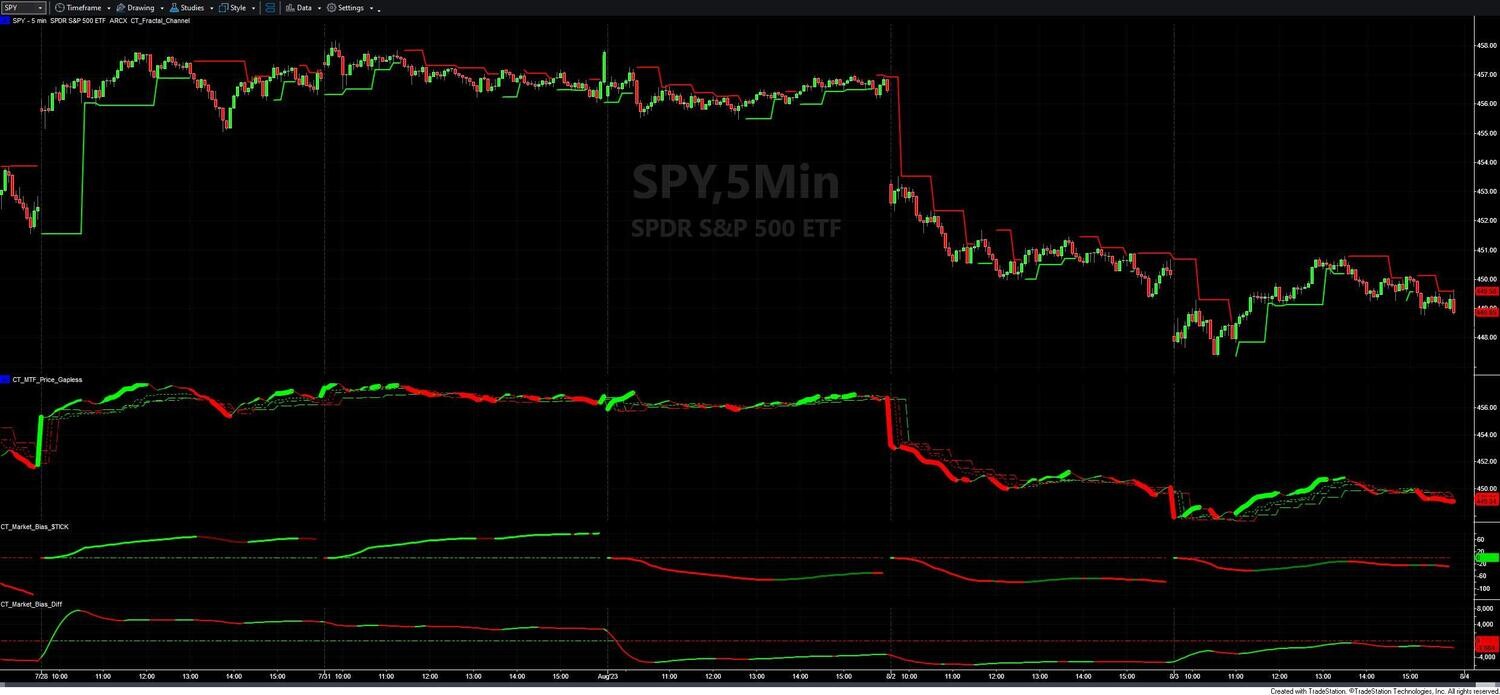
The Advanced Stock Market Directional Indicators give you two complementary tools for reading the intraday directional pressure of the broad U.S. stock market. Rather than reacting to price alone, these indicators analyze the underlying flow and relative strength driving the market — giving you a structural read on whether institutions are buying or selling, and which market segment is in relative leadership at any moment.
The package contains two indicators that answer two distinct questions:
Applied to a chart of the NYSE $TICK (the real-time count of NYSE stocks ticking up minus those ticking down), this indicator builds a cumulative Accumulation/Distribution value from the $TICK data throughout the trading day. The cumulative A/D is then smoothed with a Super Smoother and exponential average to produce a single line showing whether broad market buying pressure is building (green) or broad selling pressure is building (red) — with the noise filtered out.
Key behaviors:
4-state color coding:
The zero line is also color-coded: green when the cumulative A/D is positive (net accumulation since the open), red when negative. The indicator fires an alert whenever the color state changes — useful for flagging mid-session shifts in market character.
This indicator measures the smoothed directional differential between two user-specified market instruments. It subtracts the close of one instrument from the close of another and applies a 21-period Super Smoother to produce a clean differential line. The result tells you which of the two instruments is in relative directional leadership, and whether that leadership is strengthening or fading.
This indicator requires three data series loaded on the same chart:
The differential is calculated as Data2 − Data3. Put the instrument you want to track as the "leader" in Data2. Green = Data2 gaining relative strength over Data3; red = Data2 losing relative strength. The zero line is green when Data2 is above Data3, red when Data3 is above Data2. No user-configurable inputs — smoothing is fixed at 21 periods.
Common pairings: SPY vs. QQQ (large-cap broad market vs. Nasdaq growth), $SPX vs. $NDX, advancing issues vs. declining issues for breadth, or any two sector ETFs relevant to your trading.
The two indicators answer different questions and are designed to be read in sequence:
Step 1 — CT_Market_Bias_$TICK: Is the broad NYSE market under accumulation or distribution? This tells you the overall tone of institutional activity across all NYSE stocks right now.
Step 2 — CT_Market_Bias_Diff: Which segment is leading? This tells you where relative strength is concentrated.
| $TICK Reading | Diff Reading | Interpretation |
|---|---|---|
| Green | Rising (Data2 leading) | Strong broad accumulation with clear leadership — high-conviction long environment |
| Green | Falling (Data3 leading) | Broad accumulation but leadership rotating — be selective about which stocks to trade long |
| Red | Falling | Broad distribution with relative weakness in Data2 — avoid longs, look for shorts |
| Red | Near zero / choppy | Distribution present but no clear leadership shift — low conviction, reduce size |
The Advanced Stock Market Directional Indicators are for intraday and short-term traders who trade U.S. equity-correlated instruments and want to add broad market context to their trade filtering. Specifically:
What is the difference between the two indicators?
CT_Market_Bias_$TICK measures cumulative buying and selling pressure across all NYSE stocks using the $TICK. It tells you the overall intraday tone — is the broad market under accumulation or distribution right now? CT_Market_Bias_Diff measures the smoothed differential between two instruments you specify (e.g., SPY vs. QQQ). It tells you which segment has relative directional leadership. The two answer different questions and are designed to be read together.
How does CT_Market_Bias_$TICK handle the volatile market open?
The indicator applies early-session dampening from 9:30 to 10:30 AM — values during the first hour are scaled back significantly to prevent the elevated open volatility from skewing the cumulative reading for the rest of the day. The line also resets every morning, starting fresh accumulation from zero at each session open. This means the reading always reflects intraday bias for the current session rather than carrying over prior-day distortions.
How do I set up CT_Market_Bias_Diff with two instruments?
In TradeStation, open the chart's Format Symbol dialog and add two additional data series: Data2 (your first comparison instrument, e.g., SPY) and Data3 (your second, e.g., QQQ). The indicator calculates Data2 − Data3 and smooths the result with a 21-period Super Smoother. Assign the instrument you want to track as the "leader" to Data2 — a rising green line means Data2 has relative strength over Data3.
What does the 4-state color coding on CT_Market_Bias_$TICK mean?
The indicator distinguishes between strong and developing conditions: Green (line rising AND above the trigger) = strong, confirmed accumulation. Dark Green (rising but below trigger) = building but not yet confirmed — the transition you watch for. Red (falling AND below trigger) = strong distribution confirmed. Dark Red (falling but above trigger) = early-stage distribution developing. The transition from Dark Green to full Green, or Dark Red to full Red, is the actionable event — market-wide pressure just accelerated in one direction. An alert fires on each color state change.
Which instrument pairs work best with CT_Market_Bias_Diff?
The most common pairing is SPY vs. QQQ — when the differential is green and rising, large-cap broad market stocks are in relative leadership over Nasdaq growth; when red and falling, growth/tech is taking over. Other effective pairings: $SPX vs. $NDX for index-level comparison, advancing issues vs. declining issues for a breadth differential, or sector ETFs (e.g., XLF vs. XLK) if you trade within a specific sector context.
Can I use these with the Fractal Channel or MTF Price Action indicators?
Yes — the recommended approach is to use your primary entry indicators (Fractal Channel, MTF Price Action, candlestick patterns) to identify the setup, then check these market bias indicators to confirm the broad market is behind it. A long setup with CT_Market_Bias_$TICK at full green and CT_Market_Bias_Diff showing your index in relative leadership is a significantly higher-probability trade than the same setup against a red, distributing market.
How do I install these in TradeStation?
After purchase you will receive two EasyLanguage (.eld) files, one for each indicator. Import them via File > Import/Export > Import EasyLanguage. The setup guide includes step-by-step instructions for configuring the $TICK chart and adding the Data2/Data3 series for the differential indicator. Most traders are up and running in under 10 minutes.
What is your refund policy?
All sales are final. We encourage you to review our product videos and chart examples in the Learning Center before purchasing. If you have a technical issue after purchase, our support team is here to help.


Our indicators and trading systems are built by active traders, not software developers — every tool in this library exists because we needed it ourselves. That means each product solves a specific, real-world trading problem: the Fractal Channel Indicator gives you non-repainting support and resistance based on actual price structure, the MTF Price Action Indicator Set eliminates the need to manually correlate multiple charts, and the Risk Reward Indicator automates stop placement and position sizing on every trade.
Every indicator is built around multi-time-frame confirmation — the single most reliable edge available to independent traders. Our MTF suite covers RSI, MACD, ADX, Stochastic, VWAP, Floor Trader Pivots, and Fractal Channel, all displaying multiple time frames simultaneously on a single TradeStation chart. When a signal is confirmed across four, six, or eight time frames at once, the probability of a successful trade improves significantly over any single-time-frame analysis.
Our complete trading systems — the Trend Rider, Scalper Day Trading System, MTF Trend, Counter Trend, and MTF Consolidation Breakout — go beyond individual indicators. Each system combines RadarScreen scanning, multi-time-frame analysis, chart-based execution, and automated exit management into a fully integrated workflow. Your computer does the scanning; you make the trading decisions.
All products are instant digital downloads for TradeStation 10 and later, compatible with any market and any chart type. Every purchase includes a step-by-step installation guide, Learning Center video access, and email support. Future updates to all trading systems are included at no additional cost.