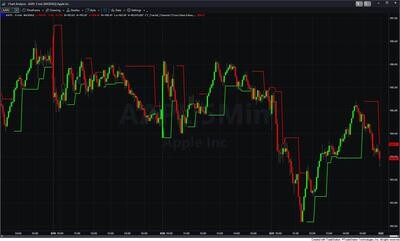

Fractal Channels • Multiple Time Frame Price Action • Time-Based Volume
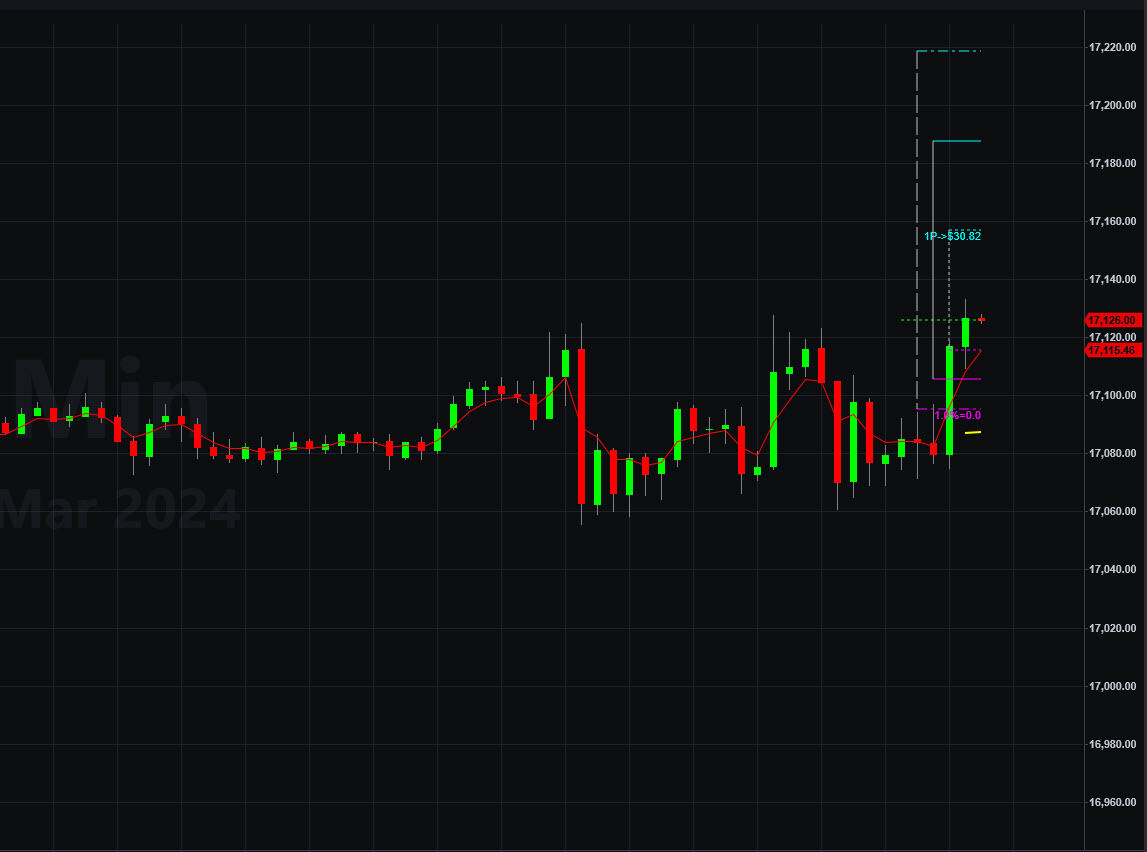
The Risk Reward Indicator is a trade planning and management tool that draws profit targets, stop reference lines, and position sizing directly on your TradeStation price chart whenever a position is open — or in pre-trade preview before you enter. It eliminates the manual step of measuring price distances and calculating contract size every time you set up a trade.
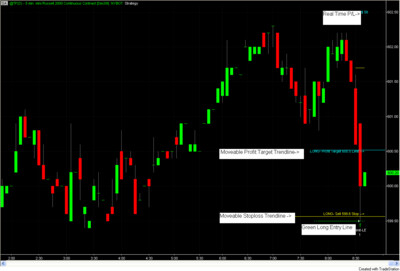
When a position opens, the indicator immediately draws a structured set of horizontal lines anchored to your entry price: three reward targets above the entry for longs (below for shorts) and three risk reference lines below the entry for longs (above for shorts), plus a yellow trailing stop and a white fractal stop. A contract sizing label below the widest risk line shows how many contracts to trade based on your account balance and risk percentage. All levels scale automatically to the instrument's recent price behavior, so the same indicator works on ES futures, individual stocks, forex pairs, or any other market without any manual adjustment.
All reward and risk levels are multiples of PD (Price Distance) — the indicator's measure of the instrument's typical price movement. PD is calculated as the simple average of four lookback averages of bar range: 5, 21, 34, and 166 bars. Blending a very short lookback (recent momentum) with longer lookbacks (structural context) produces a single value that adapts to changing volatility without overreacting to any single session. PD is recalculated fresh at the start of every new trade.
Profit targets (cyan):
A label near the 1P level shows the dollar value of that target (or pips for forex).
Risk reference lines (magenta):
Vertical connectors (light gray) link each reward level to its corresponding risk level, giving you an immediate visual of the reward-to-risk structure at a glance. The entry price is marked with a green line for longs and a red line for shorts.
When you configure your account balance and risk percentage as inputs, a text label below the 1.5R line shows the suggested contract or share count based on risking a fixed percentage of account equity at the 1.5R stop distance:
Contracts = (AccountBalance × PctOfAccountAtRisk) / (1.5R distance × BigPointValue)
The label format is 1.0%=3, showing the risk percentage and the resulting count. For fractional sizes under 1 contract, the result appears to one decimal place. As volatility expands, PD grows and the suggested count decreases automatically — keeping position size calibrated to current conditions on every trade.
Cantilever Trailing Stop (yellow, default on) — follows the trade high for longs or trade low for shorts, maintaining a fixed buffer below the high (or above the low). As the trade matures without a new extreme, the buffer narrows slightly each bar, gradually tightening as time passes. This is a reference line only — it does not generate exit orders.
Fractal Stop (white, default on) — marks the most recent structural fractal pivot low for longs or pivot high for shorts, identified using a five-bar pivot detection pattern with tie-handling for flat-top and flat-bottom formations. This is the structural floor (long) or ceiling (short) of the trade. This is a reference line only — it does not generate exit orders.
Two additional stop overlays are available as optional inputs:
Set Pre_Trade_Analysis = 1 (long) or -1 (short) to preview exactly where all levels would be placed at the current close — before you enter a position. All lines, labels, and the contract sizing display appear on the last bar using the current close as the simulated entry price. The preview disappears automatically when an actual position opens. This lets you evaluate whether a setup offers favorable risk/reward structure before committing to the trade.
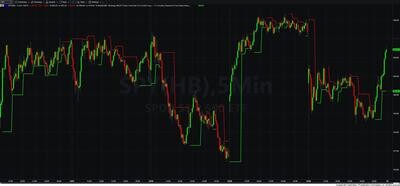
When FractalChannelOn = True, the indicator draws the ongoing fractal channel continuously across the chart — a DarkCyan line at the most recent fractal high and a DarkMagenta line at the most recent fractal low. These lines are not trade-specific; they update every bar as new fractal pivots form, providing a structural map of current support and resistance as background context. This uses the same fractal detection engine as the Fractal Channel Indicator (SKU: S06).
The indicator fires alerts when the cantilever stop is violated and the SP oscillator confirms the move:
How are the profit target and stop levels calculated?
All levels are multiples of PD (Price Distance), which is the simple average of four bar-range lookbacks: 5, 21, 34, and 166 bars. PD blends recent momentum with longer structural context and is recalculated at the start of every new trade. Profit targets are at 1.5×, 3.0×, and 4.5× PD from entry; risk levels are at 0.5×, 1.0×, and 1.5× PD from entry.
How does the position sizing calculation work?
Set AccountBalance to your actual account size and PctOfAccountAtRisk to your risk fraction (e.g., 0.01 for 1%). The indicator divides your dollar risk amount by the 1.5R stop distance times the instrument's BigPointValue to produce a contract or share count, displayed as a label below the 1.5R line.
Do the stop lines generate actual exit orders?
No. The cantilever stop (yellow) and fractal stop (white) are reference lines only. They show where a stop could be placed but do not connect to TradeStation's order system. Alerts are available for cantilever stop violations with SP oscillator confirmation.
Can I preview levels before entering a trade?
Yes. Set Pre_Trade_Analysis to 1 for a long preview or -1 for a short preview. All lines and the contract sizing label will appear on the last bar using the current close as a simulated entry price. The display clears when a real position opens.
Does it work alongside other CT indicators?
Yes. The Risk Reward Indicator focuses exclusively on risk quantification and display. It is designed to be used alongside entry indicators such as the MTF Price Action Indicator Set, Fractal Channel Indicator, or MTF Trend Trading System.
What is your refund policy?
All sales are final. Review our product documentation and the Learning Center before purchasing. If you have a technical issue after purchase, contact [email protected].


Our indicators and trading systems are built by active traders, not software developers — every tool in this library exists because we needed it ourselves. That means each product solves a specific, real-world trading problem: the Fractal Channel Indicator gives you non-repainting support and resistance based on actual price structure, the MTF Price Action Indicator Set eliminates the need to manually correlate multiple charts, and the Risk Reward Indicator automates stop placement and position sizing on every trade.
Every indicator is built around multi-time-frame confirmation — the single most reliable edge available to independent traders. Our MTF suite covers RSI, MACD, ADX, Stochastic, VWAP, Floor Trader Pivots, and Fractal Channel, all displaying multiple time frames simultaneously on a single TradeStation chart. When a signal is confirmed across four, six, or eight time frames at once, the probability of a successful trade improves significantly over any single-time-frame analysis.
Our complete trading systems — the Trend Rider, Scalper Day Trading System, MTF Trend, Counter Trend, and MTF Consolidation Breakout — go beyond individual indicators. Each system combines RadarScreen scanning, multi-time-frame analysis, chart-based execution, and automated exit management into a fully integrated workflow. Your computer does the scanning; you make the trading decisions.
All products are instant digital downloads for TradeStation 10 and later, compatible with any market and any chart type. Every purchase includes a step-by-step installation guide, Learning Center video access, and email support. Future updates to all trading systems are included at no additional cost.