
Fractal Channels • Multiple Time Frame Price Action • Time-Based Volume
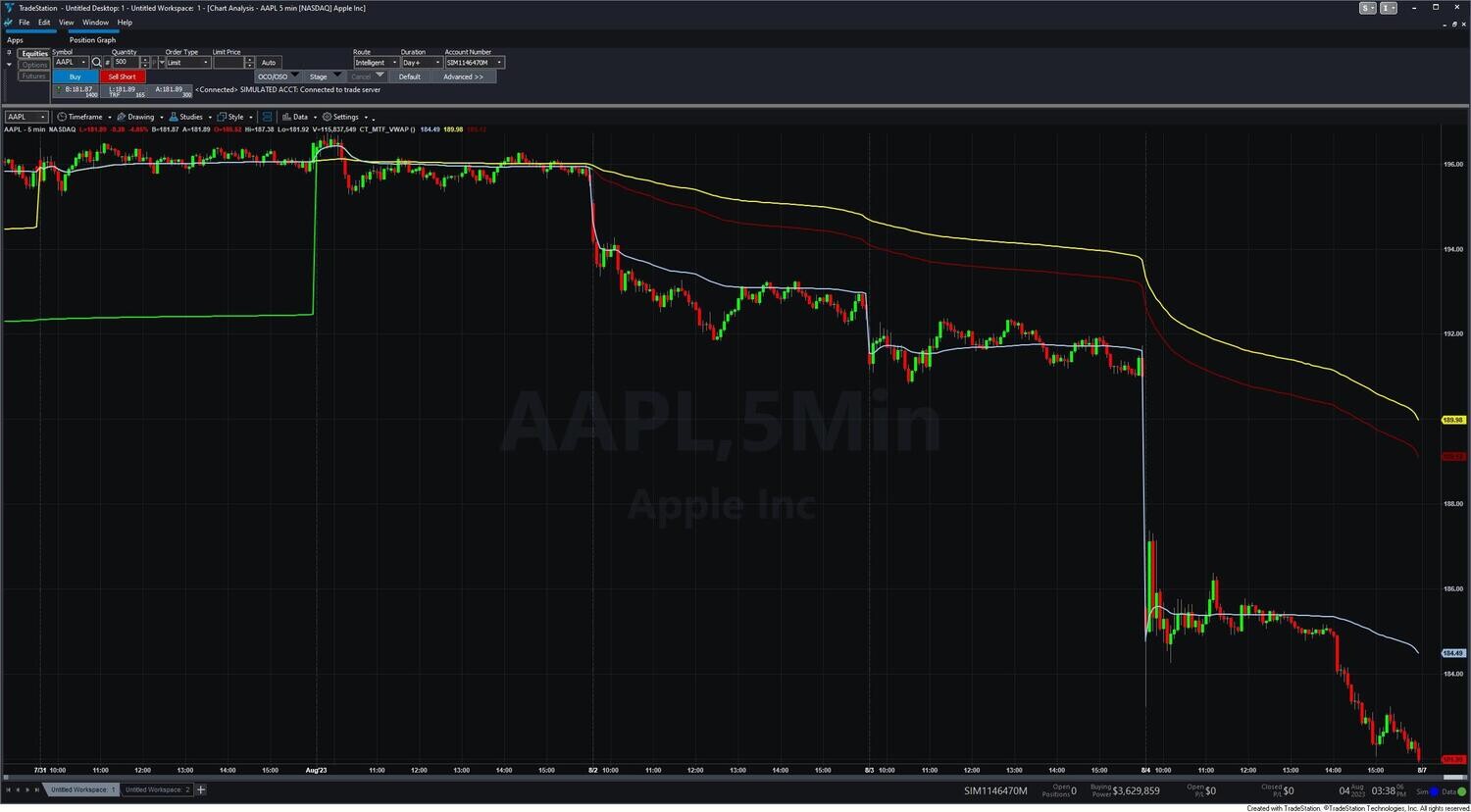
The MTF VWAP Indicator plots three Volume Weighted Average Price lines on your TradeStation chart simultaneously — one anchored to the current trading day, one anchored to the current week, and one anchored to the current month. Instead of seeing where price stands relative to today's session alone, you get the full multi-timeframe picture: whether price is at a premium or discount relative to daily, weekly, and monthly participation at the same time.
VWAP weights each price level by the volume traded there, making it a more accurate representation of the true average transaction price than a simple moving average. The monthly VWAP in particular acts as a structural anchor — institutional traders and funds commonly reference it as an execution benchmark, making it a level where significant participation (and therefore significant support or resistance) tends to cluster.
All three lines use the same formula:
VWAP = Σ (Typical Price × Volume) / Σ Volume
where Typical Price = (High + Low + Close + Open) / 4
The four-point OHLC average represents where price traded throughout the full bar range rather than just the close. The cumulative sum builds bar by bar from each reset point and is divided by total accumulated volume to produce the current VWAP level.
Daily VWAP — resets at the start of each new trading session. Reflects the average price paid by all participants from that morning's open. Intraday traders use it as the primary session reference: price above daily VWAP is bullish for the session; below is bearish.
Weekly VWAP — resets at the start of each Monday and accumulates all bars through Friday. Moves more slowly than the daily line and provides medium-term context for whether price is extended or fairly valued relative to the week's activity.
Monthly VWAP — resets at the start of each calendar month and accumulates the entire month. The slowest-moving and most structurally significant of the three lines. Reclaiming monthly VWAP from below is a high-significance event — it means monthly participants are moving from underwater to above their average entry.
The indicator has no user inputs — the three timeframes are fixed. Add CT_MTF_VWAP to a chart and it is ready immediately. Use the Format dialog to set preferred colors and line widths for the Daily and Weekly lines. The Monthly line changes color dynamically based on alignment (see below) and does not need a fixed color.
The Monthly VWAP line changes color to show the alignment state of all three timeframes at a glance:
The indicator internally computes a Trend Filter score that summarizes alignment into a single value:
The distinction between +1 and +2 is momentum: the strong readings require that the daily VWAP is actively moving in the trend direction on top of full timeframe alignment. A +1 reading means the structure is bullish but the daily VWAP may be flat or consolidating.
Fully aligned — strong trend: When all three lines are stacked in order (Daily above Weekly above Monthly for bulls, or Daily below Weekly below Monthly for bears), the market is trending with conviction across all three timeframes. This is the highest-confidence directional environment.
Mixed alignment — transition: When daily and weekly are on opposite sides of monthly, the market is in transition. DarkGreen means the daily trend has turned bullish but the weekly average hasn't caught up yet. DarkRed means the daily has turned bearish while the weekly remains elevated — the move may be early-stage.
VWAP as support and resistance: Each VWAP line acts as a dynamic mean-reversion level for its timeframe. Price pulling back to daily VWAP in an uptrend is a return to fair value for the session — a natural area for continuation entries. Weekly and monthly VWAP levels carry heavier institutional significance and tend to produce larger reactions.
As a trend filter: Take long setups when the Monthly VWAP line is green (fully bullish stack) or at minimum when price is above monthly VWAP. Take short setups when the line is red or price is below monthly VWAP. Avoid counter-trend trades against a strong stack — wait for the monthly line color to change before fading.
As a mean reversion reference: In range-bound or mixed-alignment conditions, use the VWAP lines as natural mean reversion targets. A long entered near weekly VWAP support can use daily VWAP as the first target. Monthly VWAP crossovers are high-significance events — reassess overall directional bias when price closes above or below the monthly line.
Combined with other indicators: The MTF VWAP pairs well with CT_Price_Action_Dual (confirm price action trend direction matches VWAP alignment), CT_Oscillator (look for momentum confirmation at VWAP pullback entries), and CT_Fractal_Channel (fractal bias as entry confirmation when price aligns with the VWAP stack).
What are the three VWAP timeframes?
The three timeframes are fixed: Daily (resets each session), Weekly (resets each Monday), and Monthly (resets each calendar month). There are no user inputs — the indicator is ready to use immediately after adding to a chart.
Why does VWAP use volume rather than just price?
A simple moving average weights every bar equally regardless of how much volume traded there. VWAP weights each price by its volume, so levels with heavy institutional participation carry more influence. This makes it a more accurate representation of where the market has actually been transacting — which is why institutional traders use it as their primary execution benchmark.
What does the Monthly VWAP line color mean?
The Monthly line changes color based on the alignment of all three timeframes: Green = Daily and Weekly both above Monthly (fully bullish); Red = Daily and Weekly both below Monthly (fully bearish); DarkGreen = Daily above, Weekly below (transitioning bullish); DarkRed = Daily below, Weekly above (transitioning bearish).
Why do the Daily and Weekly VWAP lines look identical on Mondays?
Both lines reset at the start of Monday — the Daily VWAP because a new calendar day began, and the Weekly VWAP because a new trading week began. They accumulate the same data from the same starting point and will track each other throughout Monday. From Tuesday onward they diverge as the Daily resets each morning while the Weekly continues accumulating from Monday.
What chart interval works best?
The indicator is best suited to intraday intervals (1–15 minute bars are most common). On daily charts, the daily VWAP collapses to a single point per session and provides less context. The weekly and monthly lines remain useful on daily charts as structural anchors.
Does the monthly VWAP require a full month of data?
For maximum accuracy, the chart should have enough historical bars to cover the current month from its first trading day. If the chart's data window starts mid-month, the monthly VWAP will not reflect the full month's activity until a new month begins and fresh accumulation starts.
What is your refund policy?
All sales are final. Review our product documentation and the Learning Center before purchasing. If you have a technical issue after purchase, contact [email protected].


Our indicators and trading systems are built by active traders, not software developers — every tool in this library exists because we needed it ourselves. That means each product solves a specific, real-world trading problem: the Fractal Channel Indicator gives you non-repainting support and resistance based on actual price structure, the MTF Price Action Indicator Set eliminates the need to manually correlate multiple charts, and the Risk Reward Indicator automates stop placement and position sizing on every trade.
Every indicator is built around multi-time-frame confirmation — the single most reliable edge available to independent traders. Our MTF suite covers RSI, MACD, ADX, Stochastic, VWAP, Floor Trader Pivots, and Fractal Channel, all displaying multiple time frames simultaneously on a single TradeStation chart. When a signal is confirmed across four, six, or eight time frames at once, the probability of a successful trade improves significantly over any single-time-frame analysis.
Our complete trading systems — the Trend Rider, Scalper Day Trading System, MTF Trend, Counter Trend, and MTF Consolidation Breakout — go beyond individual indicators. Each system combines RadarScreen scanning, multi-time-frame analysis, chart-based execution, and automated exit management into a fully integrated workflow. Your computer does the scanning; you make the trading decisions.
All products are instant digital downloads for TradeStation 10 and later, compatible with any market and any chart type. Every purchase includes a step-by-step installation guide, Learning Center video access, and email support. Future updates to all trading systems are included at no additional cost.